

Metadata captures critical facts about your data - why it was produced, when it was published, where it relates to and more. Across all stages of the built asset lifecycle, defining and implementing a metadata specification is essential to unlock construction efficiencies, guarantee long-term accuracy of information and provide context to agentic AI systems.
A metadata specification - like any set of information requirements - should be designed for the needs of the information end-users. But it's also critical to specify with an understanding of (a) what's possible and (b) what's feasible within time and budget.
At Hoppa we help customers put information management theory into action by using AI to do the heavy lifting on data cataloguing.
Throughout this guide we signpost different types of metadata you can capture with Hoppa’s wide range of data cataloguing features - so you can be confident your metadata specification is both comprehensive and actionable. Let's dive in!
- Categorical Metadata | Project, Discipline, Region
- Free-Text Metadata | Purpose, Product Catalogue ID
- Typed Metadata | Invoice Total, Certificate Expiry Date
- Provenance (Temporal) Metadata | Lineage
- Document Summaries
- Relational Metadata (Industry Taxonomies)
- Tags
- Embedded Metadata
- Document Naming Conventions
- Vector Metadata
- What Next?
Feeling inspired?
See Hoppa in action and learn how it can make the difference to your workflows.
Categorical Metadata
Classifying your files or objects into categories allows you to filter and sort information for faster retrieval than free-text search on file name alone. It also allows you to implement finer-grained permission rules to control who has access to data and join data across different storage systems.
Setting rules on the picklist options that can be chosen for a category - rather than just free-text - helps keep your metadata of high quality and can make it easier for your teams to continue to maintain the data catalogue in future.
The ISO 19650 series of standards defines a set of categorical metadata fields - including Functional Breakdown, Spatial Breakdown and Type - that can form a basis for your metadata specification. Hoppa comes pre-loaded with the ISO 19650 UK National Annex and other variants of the specification published by UK public sector bodies.
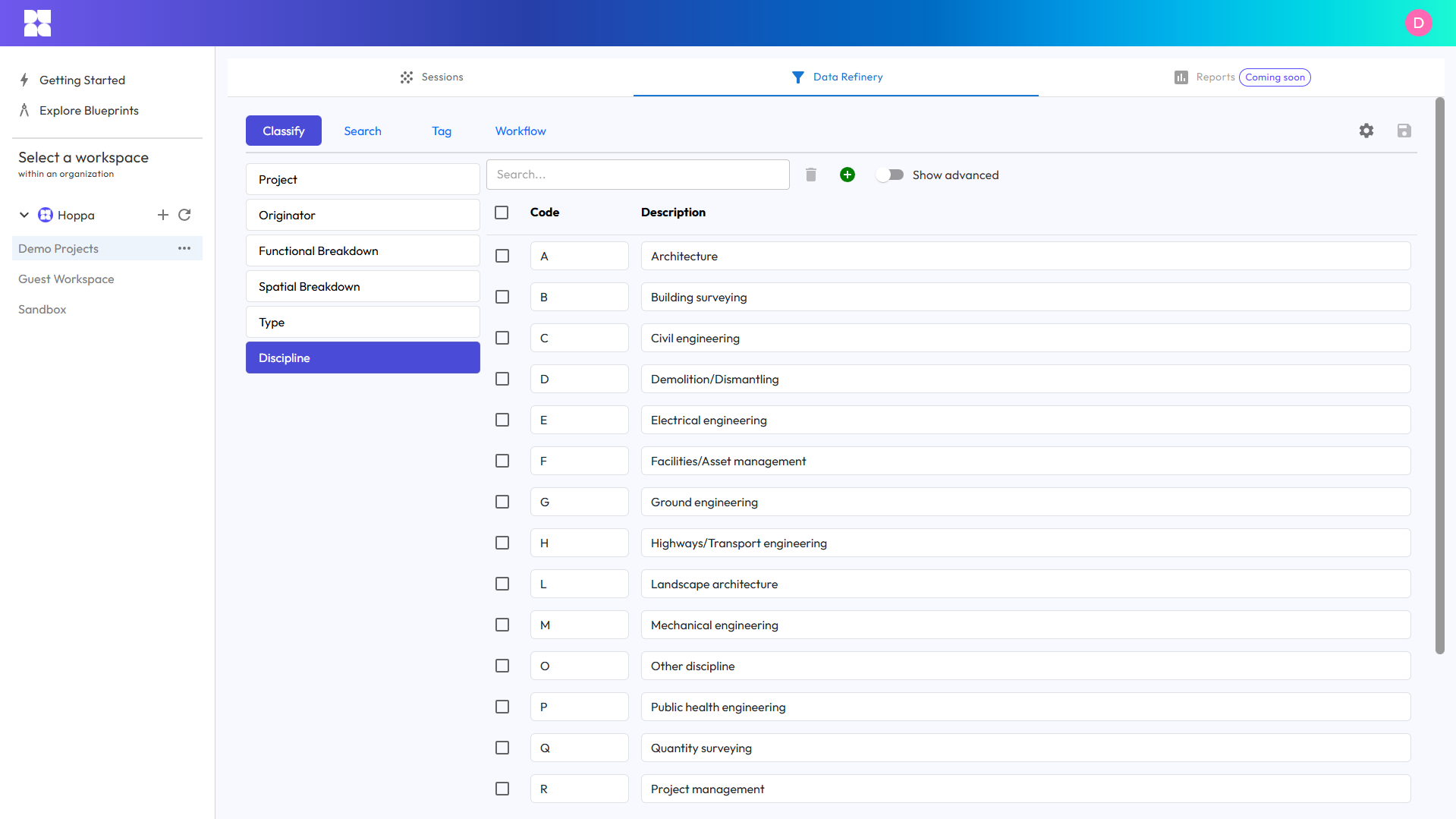 Building a categorical metadata specification in Hoppa Web
Hoppa's AI is trained to interpret categorical metadata specifications and will automatically apply the most suitable classification to each of your files (or other data objects). Unlike other tools, you don't have to rely on rule-based or pattern-matching methods that require you to understand existing data structures (and may only achieve partial matching).
If you have hierarchical dependencies between different categorical metadata fields - for example certain document Types can only be assigned to certain document Disciplines - then Hoppa's metadata specification can support this requirement. This subtype of metadata is sometimes termed dependent metadata.
Alongside each classification you'll also receive an AI Confidence Score and a plain-text justification to ensure all analysis is transparent, measurable and can be human-moderated.
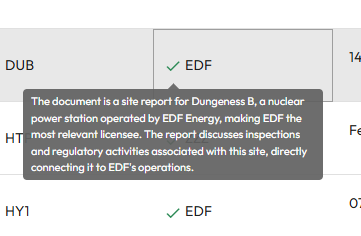 Moderating AI outputs using confidence scores and justification
Free-Text Metadata
Alongside categorical metadata, capturing free-text metadata that doesn't conform to a finite picklist of options will enrich your data catalogue with additional context. Some examples of free-text metadata are: Document Originator, Equipment Power Rating and Drawing Scale(s).
With Hoppa, you have complete control of the specification and can be as specific or open-ended as you like in how you instruct our AI to search for the information within each of your documents.
Past uses of Hoppa free-text metadata fields include: summarising key document recommendations or extracting references to contractual clauses and requirements. Free-text metadata fields are perfect for when you expect to do some downstream analysis or when you are handling a wide degree of variability in the information you expect to find, for example extracting unique information from each document.
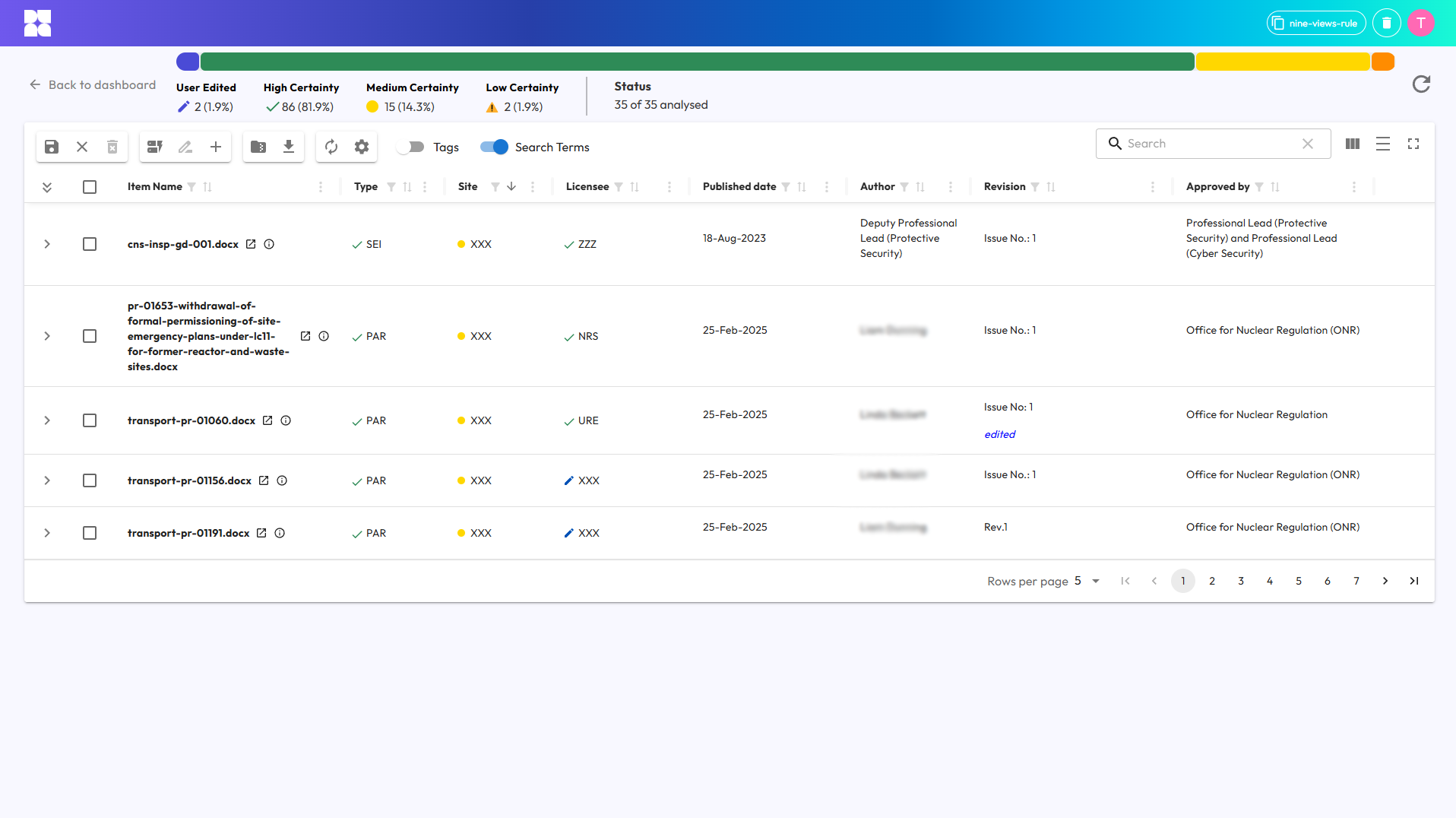 Using free-text fields to normalise metadata from different sources
Free-text metadata fields are also great for when you don't have quite enough context to be able to construct a comprehensive picklist of options for a categorical metadata field and want to allow a degree of flexibility. This allows you to implement a two-step cataloguing process - first extracting entities as free-text metadata and then classifying documents once you've normalised your free-text metadata into a categorical metadata field with a controlled picklist.
In Hoppa Web you can edit free-text metadata as you would in Excel - but with the added benefit of in-built markdown formatting for bulleted lists, hyperlinks and more.
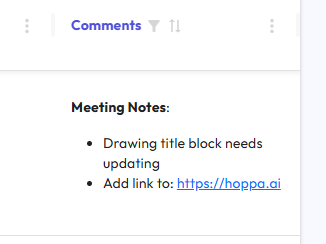 Applying markdown formatting to free-text fields
Typed Metadata
Typed metadata is similar to free-text metadata, except you can conform the outputs to a specified data type format, for example dates, currencies or latitude/longitude coordinates. This blends the flexibility of free-text metadata with the structure of categorical metadata.
If you plan to plug your data catalogue into other BI, GIS or analytics packages then typed metadata streamlines the downstream data engineering burden by extracting key facts at the point of cataloguing.
Or, if you need to perform technical oversight and quality control on the underlying data before publication into your master data catalogue then typed metadata can help you verify requirements like certification expiry date or planned vs actual spend in-month.
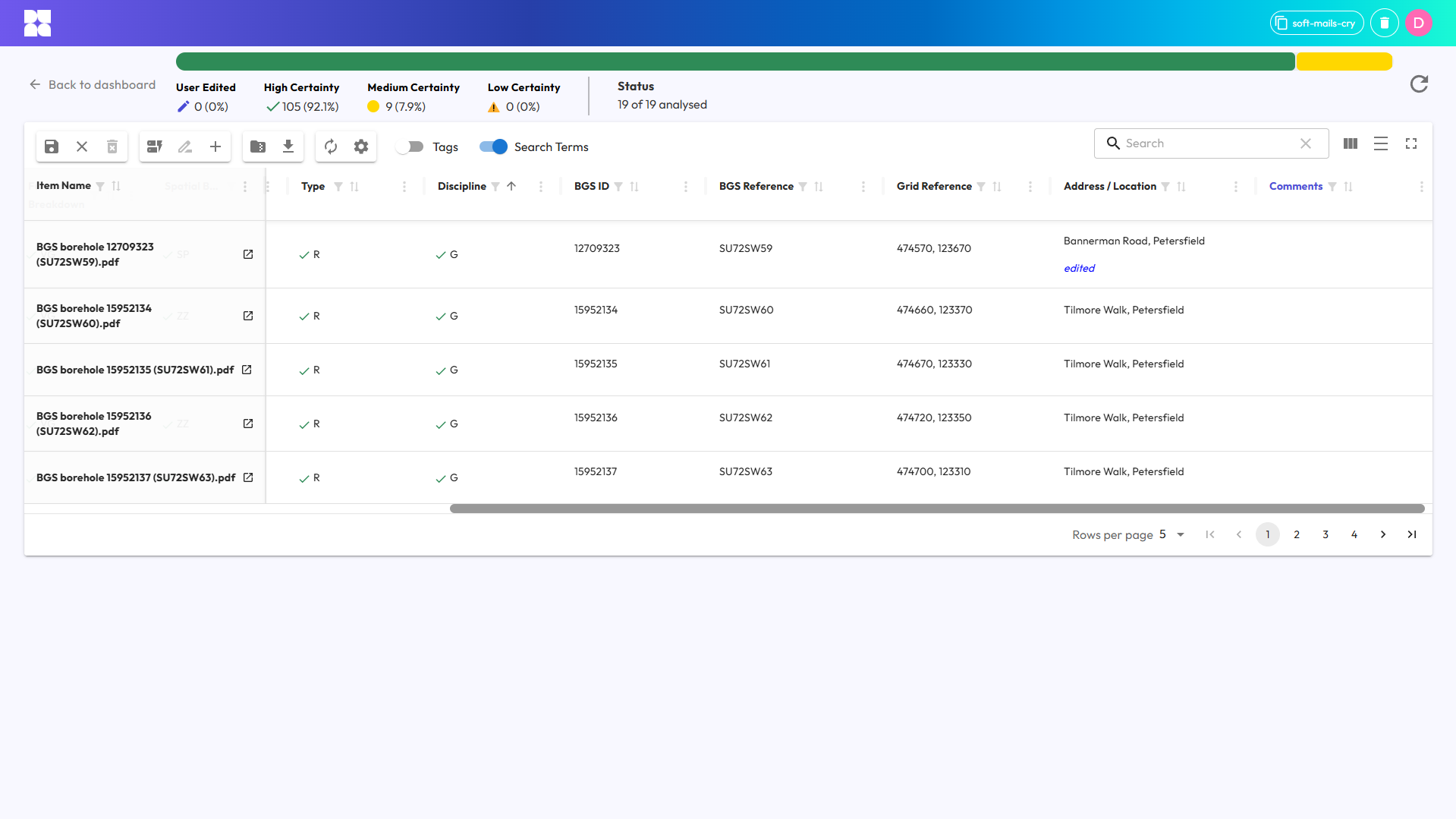 Typed metadata field for eastings & northings
Provenance (Temporal) Metadata
Many document management systems (eDMS) will generate an audit trail of who has modified a document and when. More controlled eDMS' can also apply workflows to capture metadata as documents progress through different lifecycle stages (e.g. Suitability Status, Document Originator).
If your documents have been recently digitised, the source system of record didn't have temporal metadata management features or the documents have become detached from the source metadata - for example files shared on a physical hard drive - then Hoppa can help to reestablish this document lineage by analysing the file content and any embedded file metadata (discussed later in this guide).
Document Summaries
Some proprietary file formats need specific software packages to be able to open them, meaning some of your end users may miss critical information they can't access.
Plain-text document summaries provide a way around this challenge by shortening the time taken to find the right information sources and get to the key facts.
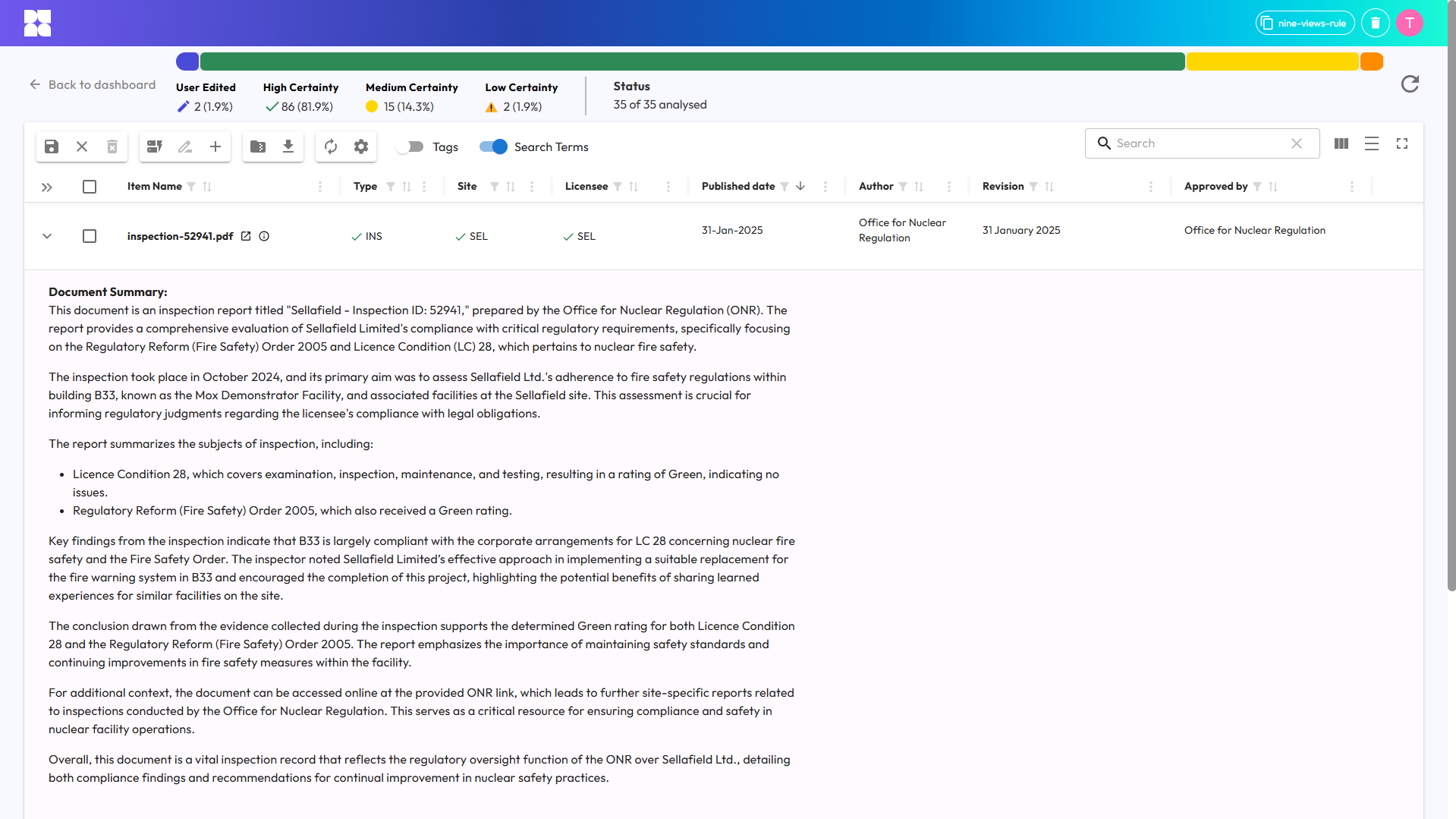 Example document summary
Hoppa's AI generates markdown-formatted summaries (including bulleted lists and sub-headings). Document summaries also come in handy when carrying out quality control (QC) checks on the data catalogue in Hoppa Web by giving you a quick sense-check on AI-applied classifications without needing to open the source file.
For proprietary model formats like Autodesk AutoCAD DWG or Autodesk Inventor files a thumbnail image is also produced to provide you with a simple glimpse of the drawing layout or spatial 3D representation.
Relational Metadata
No metadata specification exists in a vacuum, and it's likely that other teams will already be maintaining their own data catalogues which you may need to reference (or vice versa). Joining two or more datasets together like this requires both datasets to contain a common key (relational metadata). Mapping datsets to a common taxonomy and storing this as relational metadata opens up a host of interesting use cases - such as joining documents to risk registers, schedule activities or material carbon factors databases.
Whilst it's possible to join datasets directly - Document A relates to Document B - it can be more effective in the long-term to instead map your data sources against a reference taxonomy (Document A and Document B are both members of Class C) - as this will make it much easier to join your documents to other datasets in future.
One example of a published industry taxonomy is Uniclass, although larger or more data mature organisations may have their own taxonomies (or ontologies) that model real world objects and their relationships.
If you haven't seen it already, then check out the Hoppa Text-to-Uniclass Tool. It's built on a lite version of our core technology and is free-to-use.
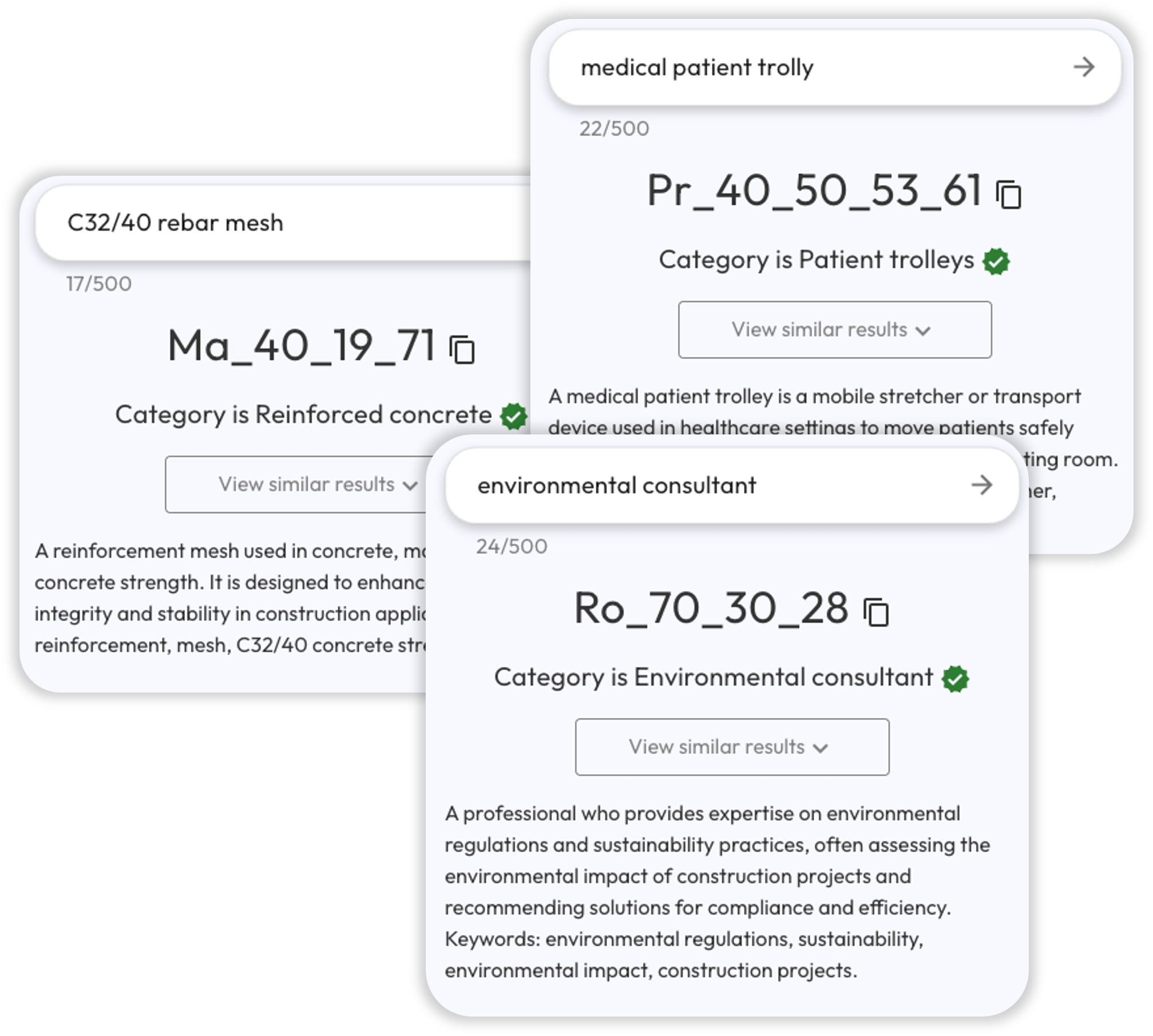
Hoppa Text-to-Uniclass Tool
There's lots of different ways you might choose to include taxonomy mapping in your metadata specification. For example, generating a set of mappings for each file (or other data object) to cover off different interrogatives/entities (Locations, System, Type, and more).
We're adding new taxonomies all the time and welcome customer input to our roadmap - so come chat to us about your use case! For the time being we're offering taxonomy mapping in beta-release so we can provide more tailored support to each of our customers.
Tags
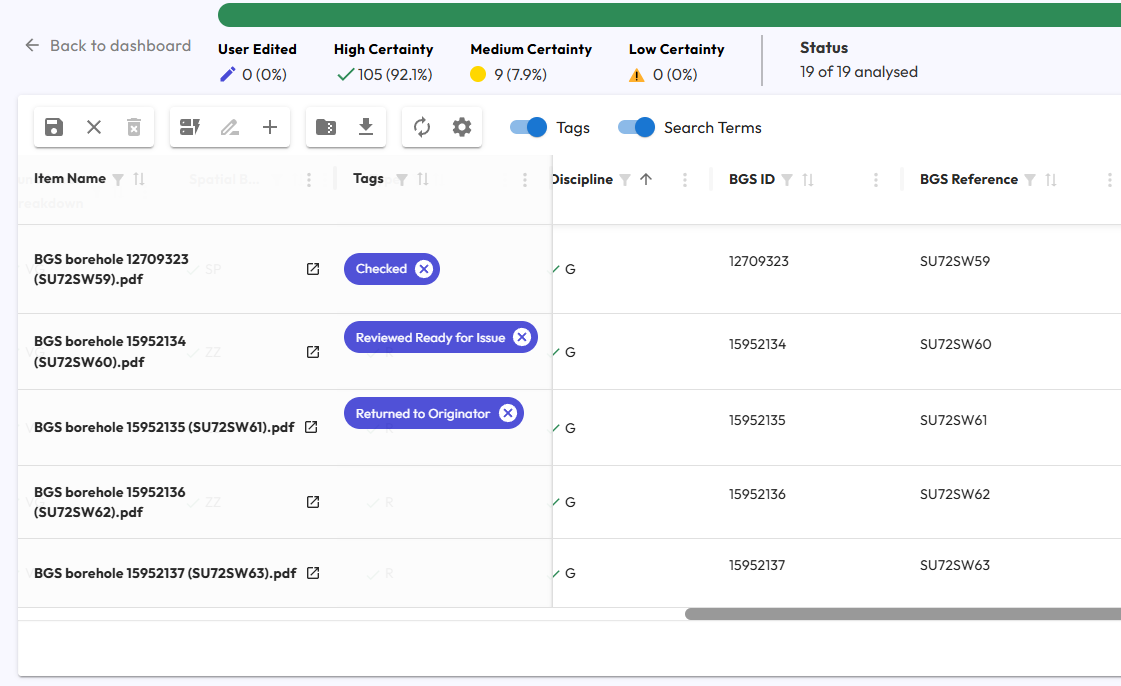
When building a data catalogue you can never be 100% sure what information you'll find. This is where you might want to consider introducing a less-controlled metadata field for tagging files.
Some use cases for tags are: marking the latest approved version of a document or flagging files that require elevated security controls or a detailed review.
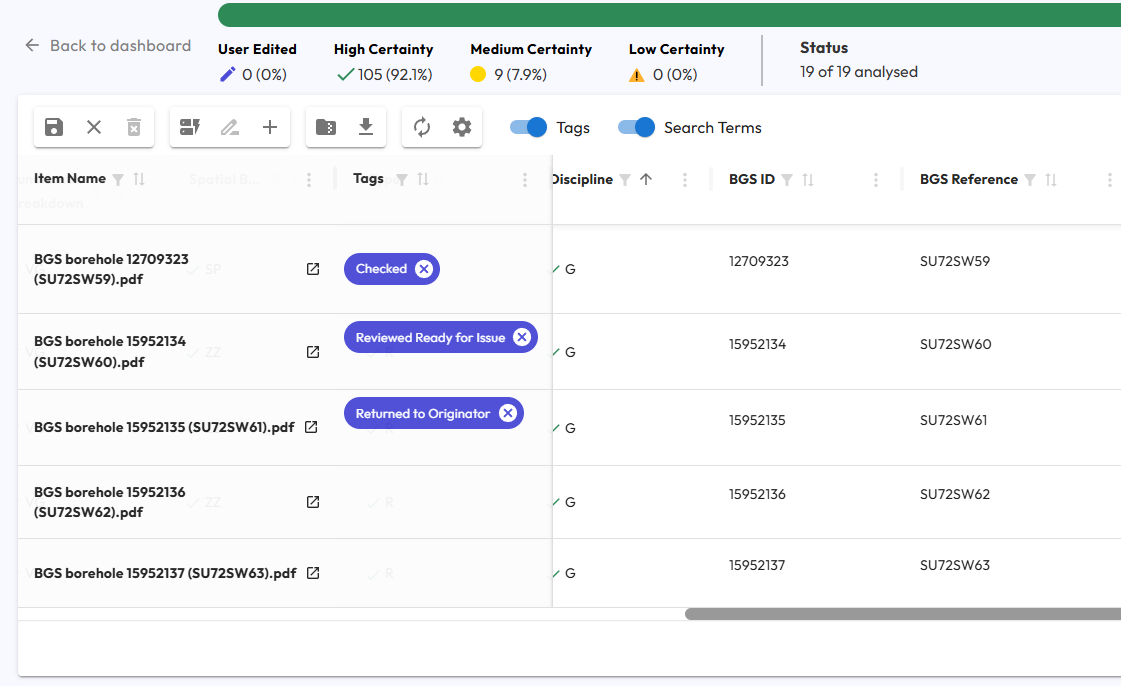 Using tags to monitor OCRA status during data catalogue curation
Tags can also be a great way to implement one-to-many relationships, for example if a document relates to multiple engineering systems.
Lists of tags can be predefined and passed to the AI for tagging and added to over time as you review and extend your data catalogue.
Embedded Metadata
As with tags, it's a good idea to allow for a degree of divergence from your data specification, as there may be pre-existing metadata that's not required today but makes sense to hang onto in case of future information needs.
Many file types (e.g. Word DOCX) embed metadata as document properties. This metadata can be quite extensive but is often uncontrolled (and of questionable quality). This can be the case with photos captured on smartphones, which can include device details and geolocation metadata.
Hoppa will automatically attempt to extract embedded metadata from common file types and proprietary engineering file formats (e.g. Autodesk Inventor) and pass this context to the AI when building your data catalogue.
This embedded metadata is then surfaced to you for context in Hoppa Web, as we'd recommend storing it just in case information requirements change over time.
Document Naming Conventions
Even once you've built a comprehensive data catalogue, it's likely that many data consumers will still use file names as their first means of searching for information.
It's often used as the unique identifier to join the document with other data sources in your data catalogue, like metadata tables. Without a controlled convention it's more likely that files will get accidentally renamed and any inferred data links get broken.
Adopting a consistent naming convention is also a really good way of indicating dependencies or version lineage between files.
So while we wouldn't recommend document naming as the master source for your metadata, it's an important aspect to consider.
You can use Hoppa to apply rule-based naming conventions, building up each document name from your metadata fields, field separators and other characters.
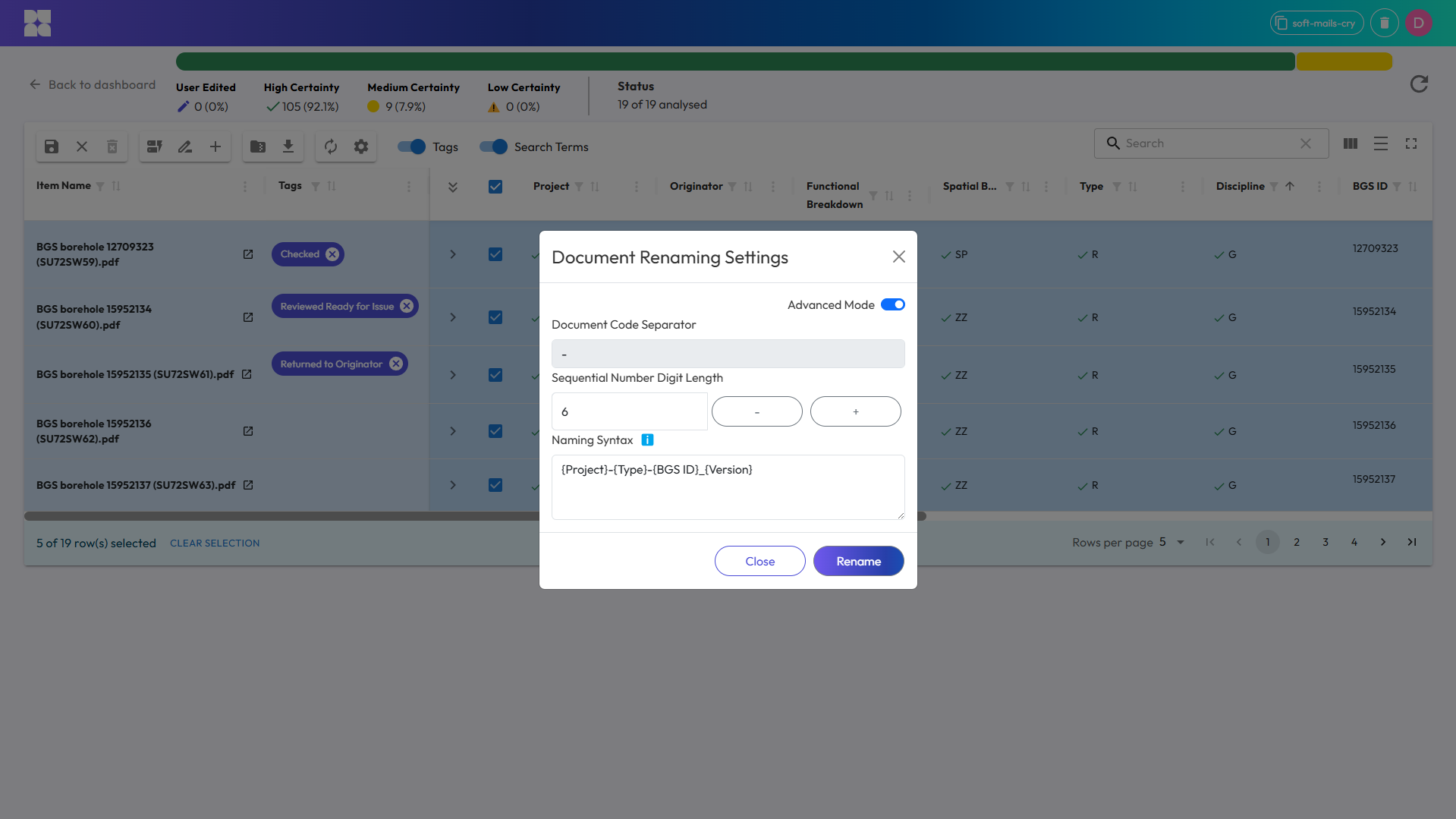 Building a document renaming rule using metadata fields
Vector Metadata
A vector embedding (not to be confused with Embedded Metadata referenced earlier in this guide) is a high-dimensional, numerical encoding of the meaning of a piece of data (text, image, sound recording etc). Embeddings are output by purpose-built models (such as the models published by Google, OpenAI, Anthropic etc) and allow machines to understand and process information efficiently, for example to cluster related documents or concepts.
You may want to generate and store vector embedding metadata to optimise your data catalogue for free-text search retrieval (e.g. 'Find all documents about concrete cure times'). However it's important to bear in mind that:
- Most embeddings models occupy their own semantic space, so you can't compare embeddings generated by different models
- If you need to generate embeddings over a long time period (e.g. two construction projects completing years apart) you should consider the long-term availability of closed-source embeddings models
- The larger the piece of data you wish to encode (text length, image size) the higher the probability that the embedding may not comprehensively capture all the underlying meaning of the data. For improved document retrieval performance it's best to limit the input length or generate embeddings for sub-sections of the data.
At Hoppa we use vector embeddings in many ways across our data cataloguing pipelines - from classification through to document-to-document mapping - and can advise on techniques best suited to your data strategy.
What next?
Hopefully you've found this a useful starter guide to developing your own data catalogues. When it comes to metadata specification there's tons to think about!
At Hoppa we're always looking to expand our knowledge in this area, as we pride ourselves on offering tailored solutions and guidance to all our customers. Our team are on hand to help you formulate your ideal metadata specification and turn it into reality using our in-house software - in a fraction of the time and cost of manual data cataloguing.
So, if you've been inspired by the above, spotted something we've missed or want to chat about your next data project then reach out to the team.
Feeling inspired?
See Hoppa in action and learn how it can make the difference to your workflows.